
Report Application Server: The Complete Guide to Enterprise Reporting, Data Integration, and Business Intelligence
In today’s data-driven business environment, organizations generate massive amounts of information every day from databases, cloud applications, enterprise software, websites, mobile apps, Internet of Things (IoT) devices, and third-party APIs. While collecting data is important, turning that information into meaningful reports is what helps businesses make informed decisions. This is where a report application server becomes an essential part of modern IT infrastructure.
A report application server is a specialized application server designed to collect data from multiple sources, process it, generate reports, and deliver those reports to users, applications, or business systems. Instead of requiring employees to manually gather information from different databases and spreadsheets, the server automates report generation, ensuring that data remains accurate, consistent, and available in real time.
Modern organizations rely on report application servers for financial reporting, sales analysis, operational dashboards, customer insights, inventory tracking, regulatory compliance, performance monitoring, and executive decision-making. By integrating information from databases, cloud platforms, APIs, enterprise applications, and business intelligence tools, a report application server provides a centralized reporting environment that improves efficiency and reduces manual work.
As businesses continue adopting cloud computing, artificial intelligence (AI), big data analytics, and digital transformation strategies, report application servers have evolved beyond simple reporting tools. Today’s solutions support automated scheduling, interactive dashboards, role-based security, real-time analytics, API integration, and scalable cloud deployment, making them a critical component of enterprise business intelligence.
This comprehensive guide explains everything you need to know about report application server, including its architecture, components, working process, key features, business benefits, implementation strategies, and real-world applications. Whether you are an IT administrator, software developer, business analyst, or enterprise decision-maker, understanding how a report application server works will help you build a faster, smarter, and more reliable reporting environment.
What Is a Report Application Server?
A report application server is software that manages the creation, processing, scheduling, and delivery of business reports.
Unlike a traditional application server that primarily hosts applications, a report application server specializes in collecting information from multiple sources and converting it into useful reports.
These reports help organizations monitor performance, analyze business operations, and support strategic planning.
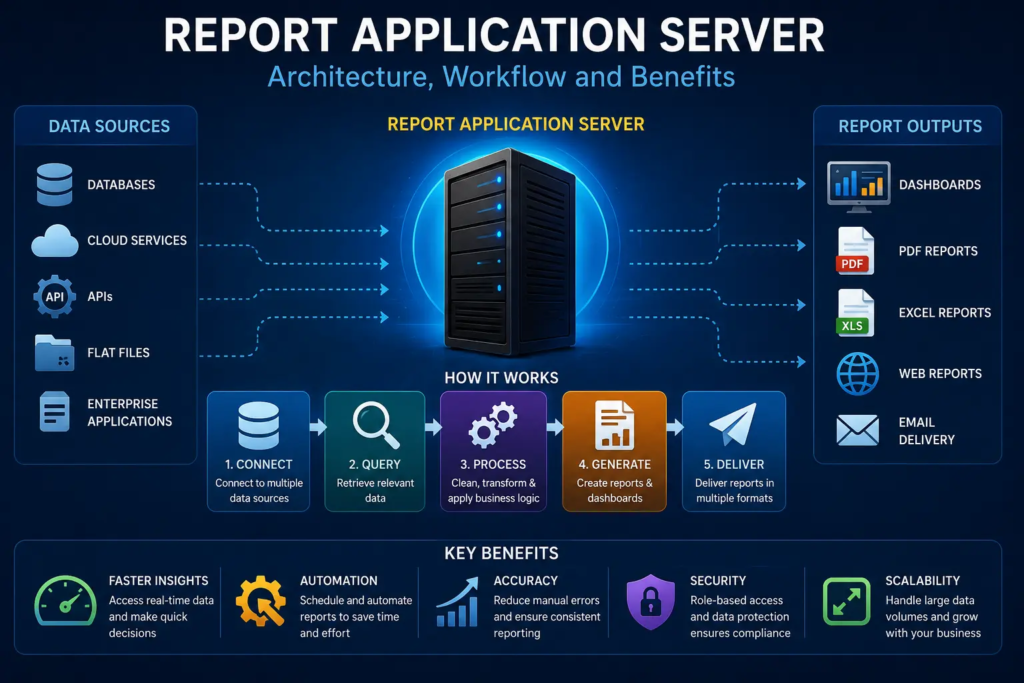
A report application server typically handles:
- Data collection
- Report generation
- Report scheduling
- User authentication
- Data processing
- Report distribution
- Performance optimization
- Security management
Its primary objective is to transform raw data into meaningful business insights.
Also read:Growth Navigate Funding: The Complete Guide to Raising Capital and Scaling Your Startup Successfully
Why Organizations Need a Report Application Server
Businesses generate information from numerous systems.
Examples include:
- Customer Relationship Management (CRM)
- Enterprise Resource Planning (ERP)
- Financial software
- Human Resources systems
- Inventory databases
- Cloud platforms
- Mobile applications
Without centralized reporting, employees often spend hours combining information manually.
A report application server automates this process.
Benefits include:
- Faster reporting
- Higher accuracy
- Better decision-making
- Reduced manual work
- Consistent business information
How a Report Application Server Works
Although implementations differ, the overall workflow follows several stages.
Step 1: Data Collection
The server connects to multiple information sources.
Examples include:
- SQL databases
- NoSQL databases
- Cloud storage
- APIs
- Enterprise applications
- Data warehouses
Information is collected automatically.
Step 2: Data Processing
Raw information often requires cleaning before reporting.
The server may:
- Remove duplicates
- Standardize formats
- Combine datasets
- Calculate metrics
- Apply business rules
Clean data produces reliable reports.
Step 3: Report Generation
The processed information becomes structured reports.
Common report formats include:
- Tables
- Charts
- Dashboards
- Graphs
- PDFs
- Excel spreadsheets
Users receive meaningful business insights.
Step 4: Report Distribution
Reports are delivered through multiple channels.
Examples include:
- Web portals
- Mobile applications
- Cloud platforms
- APIs
Automation ensures timely delivery.
Core Components of a Report Application Server
Several technologies work together.
Data Integration Engine
The integration engine gathers information from different sources.
It supports:
- Databases
- Cloud applications
- APIs
- Enterprise software
- External systems
Centralized integration improves reporting accuracy.
Reporting Engine
The reporting engine generates documents and dashboards.
Its responsibilities include:
- Formatting reports
- Calculating metrics
- Applying templates
- Rendering visualizations
The reporting engine forms the core of the system.
Scheduling Service
Many reports run automatically.
Scheduling allows organizations to generate reports:
- Daily
- Weekly
- Monthly
- Quarterly
- On demand
Automation reduces manual effort.
Security Module
Sensitive business information requires protection.
Security features often include:
- User authentication
- Role-based permissions
- Encryption
- Audit logging
Security ensures only authorized users access reports.
Administration Console
Administrators manage the reporting environment through centralized dashboards.
Typical functions include:
- User management
- Performance monitoring
- Configuration
- System health checks
Centralized administration simplifies maintenance.
Architecture of a Report Application Server
Modern report application servers commonly follow a layered architecture.
Presentation Layer
Users interact with reports through:
- Web browsers
- Mobile applications
- Dashboards
- Enterprise portals
The presentation layer focuses on user experience.
Application Layer
The application layer performs:
- Business logic
- Report processing
- Scheduling
- Authentication
- Data transformation
Most server processing occurs here.
Data Layer
The data layer stores information.
Examples include:
- Relational databases
- Data warehouses
- Cloud storage
- Big data platforms
Reliable storage supports consistent reporting.
Types of Reports Generated
A report application server supports many reporting formats.
Operational Reports
Operational reports monitor daily activities.
Examples include:
- Sales
- Inventory
- Customer service
- Production
Managers use these reports regularly.
Financial Reports
Finance teams generate reports such as:
- Revenue
- Expenses
- Profit
- Budgets
Accurate reporting supports financial planning.
Management Reports
Executives rely on summary reports.
These include:
- Key Performance Indicators (KPIs)
- Strategic metrics
- Business trends
Management reports support decision-making.
Compliance Reports
Many industries require regulatory reporting.
Examples include:
- Healthcare
- Banking
- Government
- Insurance
Automation improves compliance accuracy.
Data Sources Supported
One major advantage of a report application server is its ability to combine multiple information sources.
Also read:Context Match: The Complete Guide to Translation Memory, Accuracy, and High-Quality Localization
Common sources include:
- SQL Server
- Oracle Database
- PostgreSQL
- MySQL
- Cloud databases
- REST APIs
- ERP systems
- CRM platforms
- Excel files
- CSV files
Unified reporting improves business visibility.
Business Benefits of a Report Application Server
Organizations implementing report application servers often experience numerous improvements.
Major benefits include:
- Faster report generation
- Better data accuracy
- Improved productivity
- Reduced manual reporting
- Better collaboration
- Consistent information
- Enhanced decision-making
Centralized reporting improves operational efficiency.
Enterprise Use Cases
Many industries rely on report application servers.
Healthcare
Hospitals generate reports for:
- Patient records
- Billing
- Operations
- Compliance
Accurate reporting supports quality healthcare.
Banking
Financial institutions monitor:
- Transactions
- Risk
- Customer activity
- Compliance
Automated reporting reduces operational risk.
Retail
Retail organizations analyze:
- Sales
- Inventory
- Customer behavior
- Marketing campaigns
Reports improve profitability.
Manufacturing
Manufacturers monitor:
- Production
- Equipment
- Supply chains
- Quality control
Real-time reporting supports operational excellence.
Education
Educational institutions use reporting systems for:
- Student performance
- Attendance
- Finance
- Administration
Centralized reports improve institutional management.
Best Practices for Implementation
Organizations should follow proven strategies.
Recommended practices include:
- Define reporting objectives.
- Identify trusted data sources.
- Standardize report templates.
- Automate scheduling.
- Secure sensitive information.
- Monitor system performance.
- Train employees.
- Review reports regularly.
Proper planning improves long-term success.
Why Report Application Servers Continue Growing in Importance
Businesses increasingly depend on data for every decision.
Manual reporting no longer meets modern business requirements.
A report application server provides:
- Automation
- Accuracy
- Scalability
- Centralized reporting
- Better analytics
As organizations continue their digital transformation journeys, report application servers will remain one of the most important technologies supporting enterprise business intelligence and operational success.
Cloud-Based Report Application Server Solutions
Cloud computing has changed how organizations build and manage reporting systems. Instead of installing reporting software only on local servers, many businesses now deploy a report application server in public, private, or hybrid cloud environments.
Cloud deployment provides several advantages:
- Faster implementation
- Lower infrastructure costs
- Better scalability
- Remote accessibility
- Automatic updates
- High availability
Cloud-based report application servers also allow organizations to support distributed teams while maintaining centralized reporting.
Hybrid Reporting Environments
Many businesses use both on-premises and cloud systems.
For example:
- Customer information may remain in an on-premises database.
- Financial data may be stored in a cloud ERP.
- Marketing data may come from cloud analytics platforms.
A report application server connects these systems into one reporting environment.
This unified approach helps decision-makers view complete business performance without manually combining data from multiple platforms.
API Integration in a Report Application Server
Modern applications exchange information through Application Programming Interfaces (APIs).
A report application server can retrieve information from APIs provided by:
- CRM platforms
- Accounting software
- Payment systems
- Social media platforms
- Cloud services
- Business applications
API integration enables real-time reporting without requiring manual imports.
Organizations receive current information whenever reports are generated.
Real-Time Reporting
Traditional reports often rely on historical information.
Modern businesses increasingly require real-time insights.
A report application server supports real-time reporting by continuously collecting updated information from connected systems.
Examples include:
- Live sales dashboards
- Website visitor statistics
- Manufacturing production monitoring
- Customer support metrics
- Inventory availability
Real-time visibility helps organizations respond quickly to changing business conditions.
Interactive Dashboards
Static reports remain useful, but interactive dashboards provide deeper insights.
Modern dashboards allow users to:
- Filter information
- Drill into details
- Compare time periods
- Customize visualizations
- Export reports
Interactive reporting improves business analysis while reducing the need for multiple report versions.
Security in a Report Application Server
Business reports often contain sensitive information.
Examples include:
- Financial records
- Customer information
- Employee data
- Business strategies
- Sales performance
Security should remain a top priority.
Important security features include:
- User authentication
- Multi-factor authentication
- Role-based access control
- Encryption
- Audit logs
- Secure network communication
These measures help protect confidential business information.
Role-Based Access Control
Different employees require different reporting permissions.
For example:
Executives may access organization-wide financial reports.
Sales managers may only access regional sales reports.
Human resources personnel may only access employee information.
Role-based access ensures users see only the information they are authorized to view.
Performance Optimization
A report application server should provide fast report generation even when processing large datasets.
Performance can be improved through:
Database Optimization
Well-designed databases improve report speed.
Optimization techniques include:
- Indexing
- Query optimization
- Partitioning
- Data archiving
Efficient databases reduce report generation time.
Caching
Frequently requested reports may be stored temporarily.
Caching reduces repeated processing and improves response times.
Load Balancing
Large organizations often deploy multiple report application servers.
Load balancing distributes workloads across servers.
Benefits include:
- Better performance
- Higher availability
- Improved scalability
Artificial Intelligence in Report Application Server Technology
Artificial intelligence is changing enterprise reporting.
AI-powered report application servers can:
- Detect unusual trends
- Predict future performance
- Recommend business actions
- Generate automated summaries
- Identify reporting errors
Instead of simply displaying information, AI helps explain what the data means.
Machine Learning for Smarter Reporting
Machine learning continuously improves reporting quality.
Algorithms can:
- Identify hidden patterns
- Detect anomalies
- Forecast sales
- Predict inventory needs
- Recommend operational improvements
Predictive analytics transforms reports into decision-support tools.
Automation Features
Automation reduces repetitive work.
A report application server can automatically:
- Generate reports
- Deliver reports by email
- Refresh dashboards
- Schedule recurring jobs
- Notify users
- Archive historical reports
Automation improves productivity while reducing human error.
Challenges of Implementing a Report Application Server
Although report application servers offer many benefits, organizations should prepare for several challenges.
Data Quality Issues
Poor-quality data produces unreliable reports.
Organizations should clean information before reporting.
System Integration
Connecting older software with modern reporting platforms sometimes requires custom development.
Careful planning simplifies integration.
Security Management
As reporting environments grow, managing user permissions becomes more complex.
Regular security reviews remain essential.
Performance Under Heavy Workloads
Large organizations generate thousands of reports daily.
Infrastructure should support expected workloads while maintaining acceptable response times.
Best Practices for Long-Term Success
Organizations should follow proven strategies.
Recommended practices include:
- Standardize report templates.
- Maintain consistent data definitions.
- Monitor system performance.
- Secure sensitive information.
- Review user permissions regularly.
- Automate repetitive reporting tasks.
- Train users continuously.
- Document reporting procedures.
These practices improve reporting reliability.
Future Trends in Report Application Server Technology
Reporting technology continues evolving rapidly.
Several innovations are expected to shape future report application servers.
AI-Generated Reports
Artificial intelligence will automatically create business summaries, identify important trends, and explain changes in performance without requiring manual analysis.
Natural Language Queries
Users will increasingly ask questions using everyday language.
Examples include:
- “Show monthly sales.”
- “Compare this year’s revenue.”
- “Which products grew fastest?”
The report application server will generate reports automatically.
Cloud-Native Reporting
Cloud-first architectures will become increasingly common.
Organizations will deploy highly scalable reporting platforms that automatically expand as workloads increase.
Self-Service Business Intelligence
Employees will create customized reports without requiring technical expertise.
Self-service reporting improves productivity while reducing IT workload.
Predictive and Prescriptive Analytics
Future report application servers will not only explain past performance but also recommend future actions based on AI-driven analysis.
Why a Report Application Server Is Essential for Digital Transformation
Modern organizations compete using data.
Executives need fast, accurate, and reliable information to make strategic decisions.
A report application server supports digital transformation by:
- Centralizing business information
- Automating report generation
- Improving reporting accuracy
- Supporting cloud integration
- Enabling real-time analytics
- Enhancing business intelligence
Organizations that invest in modern reporting infrastructure become more agile and better prepared for future growth.
Conclusion
A report application server has become an essential technology for organizations that depend on accurate, timely, and centralized business reporting. By collecting data from multiple sources such as databases, cloud platforms, APIs, enterprise applications, and data warehouses, it transforms raw information into meaningful reports that support better decision-making across every department.
Unlike manual reporting processes, a report application server automates data collection, report generation, scheduling, and distribution, significantly improving efficiency while reducing errors. Modern solutions also integrate advanced capabilities such as cloud deployment, real-time analytics, interactive dashboards, artificial intelligence, machine learning, and role-based security, making them a key component of enterprise business intelligence.
As businesses continue expanding their digital operations, the demand for scalable, secure, and intelligent reporting systems will continue to grow. Organizations that implement a well-designed report application server, supported by strong data governance, reliable security practices, and continuous performance optimization, will be better positioned to improve operational visibility, accelerate decision-making, and maintain a competitive advantage in an increasingly data-driven marketplace.
Frequently Asked Questions (FAQs)
What is the difference between a report application server and a traditional application server?
A traditional application server primarily hosts and runs business applications, while a report application server specializes in collecting data, processing information, generating reports, scheduling report delivery, and supporting business intelligence.
Can a report application server connect to cloud services and APIs?
Yes. Modern report application servers are designed to integrate with cloud platforms, REST APIs, enterprise software, databases, and third-party applications, allowing organizations to generate reports from multiple connected data sources.
Is a report application server suitable for small businesses?
Yes. Small businesses can use a report application server to automate reporting, improve data accuracy, reduce manual work, and gain better visibility into sales, finances, inventory, and customer performance without needing large IT teams.
How does artificial intelligence improve a report application server?
Artificial intelligence enhances reporting by identifying trends, detecting anomalies, generating automated summaries, forecasting future performance, and recommending actions based on business data, making reports more valuable for decision-making.
What should organizations consider before implementing a report application server?
Organizations should evaluate their reporting requirements, data sources, integration needs, security policies, scalability goals, user access requirements, and long-term business objectives to ensure the reporting environment supports both current operations and future growth.